You are hereThermal Control
Thermal Control
Thermal Control
This Section deals with the Thermal Control and relative Control Laws.
As shown in Figure 1, the screen of Spazio Software relative to Thermal Control is divided in two parts:
1. Control Laws
2. Thermal Controls
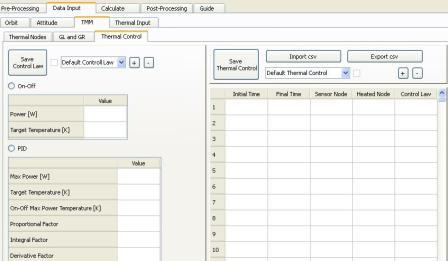
Figure 1
CONTROL LAWS
In the left side of the screen they are 3 Buttons, a Check Box, a Combo Box, two Radio Buttons and two Tables.
With + Button it is possible to generate a new Thermal Control Law.
Once pressed, you must insert in the Combo Box the name of the Law created.
With – Button it is possible to delete a Thermal Control Law, a Dependence can be detected.
With the Combo Box it is possible to visualize data relative to a Control Law created previously.
If Check Box is checked, the Control Law has been saved previously and has data associated to it.
With “Save Control Law” Button it is possible to save inserted data, a Dependence can be detected.
Radio Buttons are mutually excclusive.
To save a Control Law you must select one Radio Button.
Data of the Table relative to the selected Radio Button must be all convertible to numbers and greater than zero, otherwise an error is shown.
THERMAL CONTROLS
In the right side of the screen, they are 5 Buttons, a Combo Box, a Check Box and a Table.
With + Button it is possible to create a new Thermal Control.
Once pressed, you must insert in the Combo Box the name of the new Thermal Control.
With – Button, it is possible to delete a Thermal Control, a Dependence can be detected.
There are also two Buttons to import and to export the data of the Table in CSV format.
With the Combo Box it is possible to visualize data relative to a Thermal Control created previously.
If Check Box is checked, the Thermal Control has been saved previously and has data associated to it.
With “Save Thermal Control” Button it is possible to save inserted data, a Dependence can be detected.
Data Insertion of Thermal Controls
The following considerations apply to each row of the Table in the right side onf Figure 1.
If the five fields are all empty the row is neglected.
The first four fields must be convertible in numbers.
The first field must be greater or equal to 0.
The second field must be greater than first field.
Parts of the time interval defined by first two fields are neglected if not included in the time interval used to calculate Temperatures.
Third and fourth fields must be greater than 0.
If a Thermal Node inserted in third and/or fourth fields is not defined nor in a TMM Node Set, nor in a Thermal Model, an error will be shown in Thermal Input generation.
Third and fourth fields con contain the same Therma Node.
Fifth field must contain a Control Law generated and saved previously: the Check Box in the left side of Figure 1must be checked if in the relative Combo Box is selected the Control Law inserted in the fifth field.