You are hereThermal Nodes
Thermal Nodes
Thermal Nodes
Thermal Nodes Section allows to introduce Thermal Nodes absent in the Thermal Model and to assign parameters to Thermal Nodes of a Thermal Model.
As it is shown in Figure 1, there are 5 Buttons, a Combo Box, a Check Box and a Table.
Through the Combo Box it is possible to select a Set of TMM Nodes pre-existent.
If data are associated to the Set of TMM Nodes shown in the Combo Box, the Check Box is checked.
With + Button it is possible to create an empty Set of TMM Nodes.
If the + Button is pressed, you must specify in the Combo Box the name of the new Set of TMM Nodes.
With – Button it is possible to delete a TMM Nodes Set, and a Dependence can be detected.
There are also two Button sto import and export data in the Table of Figure 1 in CSV format.
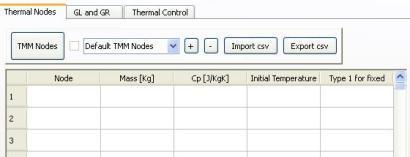
Figure 1
Parameters Introduction of a TMM Nodes Set
Following considerations apply independently to each row of the Table in Figure 1, except for the fact that if two rows contains the same Thermal Node an error is shown.
If the five fields are all empty the row is neglected.
If one of the five field is not empty and the first field is empty an error is shown.
If field 2,3,4 are all empty and the first field is not empty an error is shown.
Fields must be empty or convertible to numbers.
If the fifth field is not empty, it can assume only the values 0 and 1.
If Mass and/or CP are not specified for a TMM Node that is not present in the Thermal Model, an error will be shown in Thermal Input generation.
If a Thermal Node is not present in the Thermal Model in which Mass and/or CP was defined, an error will be shown in Thermal Input generation.
If Mass and CP are specified for a TMM Node that is present in the Thermal Model, these values overwrite those of the Thermal Model if they are present.
If the fifth field has value 1 and the fourth field is empty an error is shown.
If the fifth field has value 1, the Temperature of the corresponding TMM Node is fixed during Temperature Analysis, otherwise it is variable.
In the case in which the fourth field is empty an initial Temperature of 0 Kelvin is assumed.