You are hereThermal Input
Thermal Input
Thermal Input
In the following Section are described:
1. GMM Fluxes
2. Thermal Input
In Figure 1 is shown that in Thermal Input screen of Spazio Software it is possible to insert:
1. In the bottom, data relative to GMM Fluxes
2. I the upper, data relative to Thermal Inputs
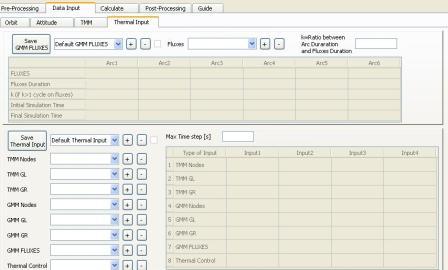
Figure 1
GMM FLUXES
The scope of this Section is to define Solar, Planet and Albedo Fluxes used by Temperature Analysis.
It is also defined the temporal range in which Temperature are calculated.
There are five Buttons, a Combo Box, a Check Box, aLine Edit and a not editable Table.
With + button in the left it is possible to generate a Set of GMM Fluxes.
Once pressed it is necessary to insert in the Combo Box in the left the name of the Set created.
With – Button in the left it is possible to delete a Set, a Dependence can be detected.
With the Conbo Box in the left it is possible to diplay data relative to Sets previously created.
If the Check Box is checked, the Set has been saved previously and has data associated to it.
With the “Save GMM Fluxes” Button it is possible to save data inserted, a Dependence can be detected.
Data Insertion of GMM Fluxes
In the Combo Box in the right, Fluxes saved in the Calculate screen are inserted automatically. They are the Outputs of Fluxes Analysis for which a Simulation has been made.
If for an Output of a Fluxes Analysis has been made a Simulation:
1. This Output is present in the Combo Box in the upper right of Figure 1
2. If it is selected in the Combo Box of Output Section of Calculate screen, then relative Check Box in Start Section is checked
Pressing + Button in the left, the result of Fluxes Analysis selected in the Combo Box in the right is inserted in the not editable Table, a Dependence can be detected.
Precondition so that it can happen is the insertion of a numeric value greater than 0 in the Line Edit “Ratio Between Arc Duration and Fluxes Duration”, otherwise an error is shown.
If this value is less than 1, only a part of data calculated in Fluxes Analysis are used for Temperature Calculus.
If this value is greater than 1, data of Fluxes Analysis are reproduced cyclically.
Pressing – Button in the right, it is possible to delete data from the not editable Table, a Dependence can be detected.
Pressing – Button in the right, the last inserted result of the not editable Table, whose name corresponds to the text selected in the Combo Box in the right, is deleted.
If the result is not present in the Table or in The Combo Box, the pressure of the – Button is ignored.
Pressing + and – Buttons, data relative to the Set of GMM Fluxes are deleted, it is therefore necessary to save again the Set pressing the “Save GMM Fluxes” Button, therefore the check of the Check Box is deleted.
THERMAL INPUT
Scope of this Section is to direct all results obtained previously in a single Input for the Temperature Analysis.
With the + Button in the top it is possible to generate a new Thermal Input.
Once pressed you must to insert in the Combo Box in the top, the name of the Thermal Input created.
With – Button in the Top, it is possible to delete a Thermal Input, a Dependence can be detected.
With the Combo Box in the top, it is possible to diplay data relative to the Thermal Input previously created.
If the Check Box is checked the Thermal Input has been saved previously and has data associated to it.
Whit “Save Thermal Input” Button it is possible to save data inserted, a Dependence can be detected.
Data Insertion of Thermal Input
Data inserted in the not editable Table are of 8 different types:
1. TMM Nodes
2. TMM GL
3. TMM GR
4. GMM Nodes
5. GMM GL (not supported)
6. GMM GR
7. GMM Fluxes
8. Thermal Control
For each of these types it is possible to insert until 4 set of data in the same Thermal Input.
In the 8 Combo box are loaded automatically the Set of results of the various Analysis performed with Spazio Software.
If a Set of results exists:
1. This Set is present in one of the 8 Combo Box of Figure 1
2. If the Set is selected in the relative Combo Box of the Spazio Software, than the relative Check Box is checked.
Pressing one of the 8 + Buttons, the Set of data selected in the relative Combo Box is inserted in the not editable Table, a Dependence can be detected.
If the Set of Data is present in the not editable Table, an error is shown.
If the relative Combo box is empty, the pressure of the + Button is ignored.
Pressing one of the 8 – Buttons, the last Set of data inserted, whose name is selected in the rlative Combo Box, is deleted from the not editable Table, a Dependence can be detected.
If the Set of data is not present in the not editable Table and/or in the relative Combo box, the pressure of the – Button is ignored.
Pressing – and + Buttons, data relative to Thermal Input are deleted: you must save again the Set pressing the “Save Thermal Input” Button, therefore the check of the Check Box is deleted.
The Line Edit “Max Time Step [s]” allows to insert the max temporal interval between two moments for which Temperatures are calculated.
If it is empty, the time interval is the maximum allowed by numeric convergence of the simulation.