You are hereAttitude
Attitude
Attitude
In this Section is implement the Attitude of Satellite.
To execute the Mission Analysis, an Attitude for each Orbital Arc Input of the Mission Analysis must be defined.
Two methods are available to define the Attitude of a Satellite with Spazio Software.
First method needs the definition of four vectors.
Second method needs the introduction of Euler’s Angles.
The Combo Box Arc identify the Orbital Arc considered.
Choosing an element f this Combo Box, relative Attitude data will be shown.
If the Orbital Arc has an Attitude, Arc Check Box is checked.
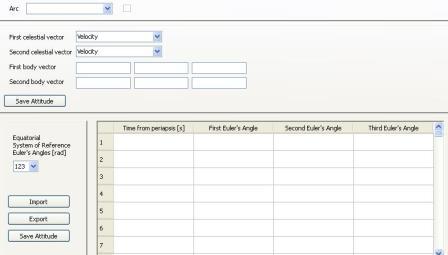
Figure 1
Four Vectors Definition
The Four Vectors are named:
1. First celestial vector
2. Second celestial vector
3. First body vector
4. Second body vector
Celestial Vectors can be defined each one with six different method.
The six possibilities are enclosed in the Combo Box relative to the Celestial Vector considered:
1. Velocity
2. Nadir
3. Sun
4. Orbital Reference System
5. Equatorial Reference System
6. Ecliptic Reference System
In the case in which one of the three first options is selected, the relative Celestial Vector is defined completely.
Otherwise, you must insert the three components of the vector in the chosen System of Reference.
In the case of the Body Vectors, you must introduce the three component of each vector in the Thermal Model System of Reference.
For each Orbital Point the First Celestial Vector and the First Body Vector will be collinear.
Also be collinear the vectors normal to the two planes formed the first by the two Celestial Vectors, the second by the two Body Vectors.
The length of the Four Vectors is an irrelevant parameter.
In the case the two Celestial Vectors or the two Body Vector are collinear, an error message is shown.
Once you have chosen the Four Vectors, you can save the Attitude of the Orbital Arc shown in the Combo Box Arc.
In this case the Check Box relative to the Orbital Arc selected is checked.
Pressing the Button Save Attitude a Dependence can be noticed.
Euler’s Angles Definition
Typically an AOCS analysis gives among various output the Euler’s Angles.
The Second Method to define the Attitude of a Satellite with Spazio Software is to indicate Euler’s Angles in some moments.
Euler’s Angles in moments not defined by the user are obtained with linear interpolation of each Angle.
All 12 possible configurations of Euler’s Angles are available in the relative Combo Box.
The choice is typically an Output of AOCS analysis.
The System of Reference of Euler’s Angles is the Planet-centric System of Reference.
It is possible to import or export to CSV data of Table shown in Figure 1.
Once chosen Euler’s Angle sit is possible to save the Attitude relative to the Orbital Arc shown in Arc Combo Box.
In this case the Check Box relative to the Orbital Arc selected is checked.
Pressing the Button Save Attitude a Dependence can be noticed.